
OnlyFans renewal behaviour depends almost entirely on whether the page you follow is free or paid. A free page never charges a recurring fee, so there is nothing to renew in the subscription sense. A paid page charges on a repeating cycle until you cancel. Switching between the two types changes what happens next month, and the change is not always obvious. This article explains how renewal works on each page type and what to plan for when you switch.

Renewal is the single most misunderstood part of the platform. Many users assume that unfollowing, muting, or simply losing interest stops the charge. It does not on a paid page. The subscription renews automatically unless you turn auto-renew off or cancel outright. Free pages work differently because the price is set to $0, and a follow is not a billing agreement.
Platform growth explains why this matters more now than it did a few years ago. OnlyFans has no built-in discovery feed or directory, so users find pages through external ranking sites and links. That means most people follow several pages at once, often a mix of free and paid. Each type bills or fails to bill on its own schedule. Keeping those schedules straight is the core skill this article covers.
Free pages and renewal
Following a free page is not a paid renewal. When the price is set to $0, no recurring charge exists, and no auto-renew toggle applies. The follow simply gives you access to the page feed and direct messages. Nothing renews because nothing was billed in the first place.
That does not mean a free page costs nothing forever. Free pages earn through pay-per-view messages and tips, so charges appear only when you actively unlock or send something. The follow itself stays free until you take that action. If you never unlock a message and never tip, the page can stay at zero spend indefinitely.
The practical steps for managing a free follow are straightforward:

Paid pages and renewal
On a paid page, auto-renew drives the recurring charge. The subscription renews at the end of each paid period until you cancel it or turn off auto-renew. Following the page is the same act as subscribing, so there is no separate step to begin billing.
Paid subscriptions typically sit between $4.99 and $15, with many landing in the $5 to $10 range. The full paid range runs from $4.99 at the minimum to $49.99 at the maximum. There is no base price below $4.99; only a promotional first month may dip under that figure. After the promotion ends, the standard price applies on the next cycle.
Here is what to expect month by month on a paid page:
- Month one: the charge you agreed to at checkout, which may be a discounted first month.
- Month two onward: the standard price unless you cancel before the renewal date.
- Any tips or pay-per-view unlocks, which are separate from the subscription.
- No partial refunds if you cancel midway through a paid period.
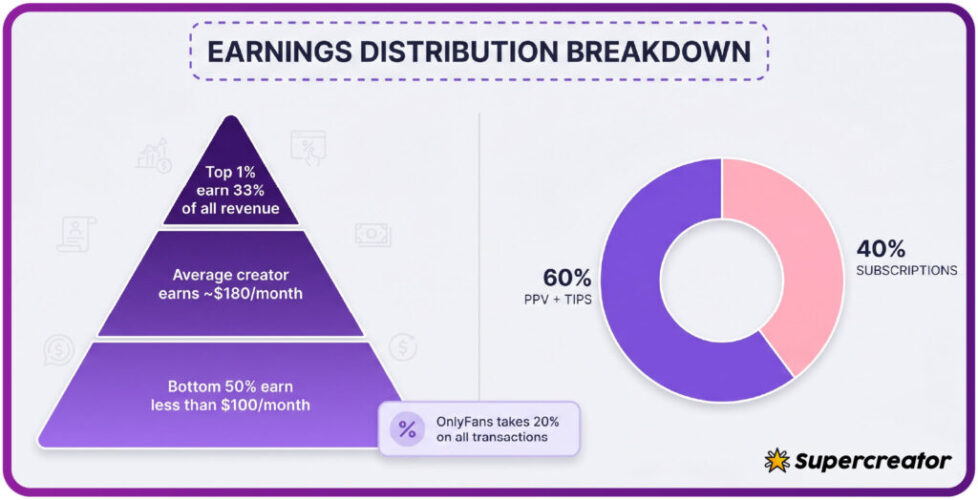
- The full amount each cycle, with the platform taking 20% and the creator keeping 80%.
Practical tip: if a creator raises the subscription price, auto-renew stops automatically. Your existing access lasts until the current paid period ends, so you are never charged the new price without choosing to resubscribe.
That rule catches people out in both directions. Some users assume a price rise means an immediate charge; it does not. Others assume their access continues; it ends when the paid period runs out. Check the renewal status after any price change on a page you follow.

Switching from paid to free
When a creator switches a page from paid to free, the subscription you held no longer bills. You keep chat access in most cases, since the page remains open to followers. What ends is the recurring charge and any subscriber-only status tied to the paid tier.
The cleanest way to think about it is by what carries over and what does not:
- Keeps: your chat history with the creator and your access to the free feed.
- Keeps: any media you already unlocked or downloaded within platform rules.
- Ends: the recurring subscription charge on the next cycle.
- Ends: subscriber-only posts that were gated behind the paid tier.
- Ends: any promotional rate you had locked in before the switch.
Do not assume the switch is instant on your billing side. If you paid for a period, that period usually runs to its end.

Switching from free to paid
When a free page becomes paid, the first paid charge resets the cycle. Your follow converts into a subscription, and the renewal date is set from the moment of that first payment.
The mistakes to avoid at this stage are predictable:
- Assuming your old free follow exempts you from the new price.
- Forgetting that the first charge may be a promotional rate that later rises.
- Leaving auto-renew on by default when you only wanted one month.
- Ignoring the renewal date and being charged for a second period.
- Mixing up tips and unlocks with the subscription itself in your budget.
If you are unsure whether you want to continue, cancel before the renewal date and resubscribe later if you change your mind. Cancelling does not remove your access for the current period.

Cost comparison
The two page types differ in base price, add-on spend, and renewal behaviour. The table below summarises the practical differences without exaggerating either side. A practical starting point is best only fans bios, which lists pages by the signals above.
| Factor | Free page | Paid page |
|---|---|---|
| Base price | $0 | $4.99 to $49.99, typical $4.99–$15 |
| Recurring charge | None | Auto-renews each period until cancelled |
| Add-on spend | Pay-per-view messages and tips | Pay-per-view messages and tips on top of the subscription |
| Platform fee | 20% on every unlock and tip | 20% on subs, tips and pay-per-view |
| Creator share | 80% of each charge | 80% of each charge |
| Renewal reminder | Not applicable | Subscription list shows the next date |
The totals can end up closer than they look. A free page with frequent unlocks can cost more per month than a single low-priced subscription.

PPV on free pages
A zero-dollar page still generates charges through pay-per-view and tips. The subscription is free, but the media inside is not.
The ways a free page produces charges are limited and predictable:
- Pay-per-view messages sent to your inbox that you choose to unlock.
- Tips you send directly, either unprompted or in response to a request.
- Bundled media offers that group several items into one price.
- Promotional unlocks at a reduced price for a limited window.
Because nothing renews, a free page cannot surprise you with a recurring charge. It can, however, surprise you with a total.
Tracking both types
A single running total is the only reliable way to compare free and paid follows. Subscriptions show up in one place; unlocks and tips do not.
A simple monthly review covers most of it. Add up each active subscription on its renewal date, then add every unlock and tip you made in the same period.
Ranking services help with the discovery side rather than the billing side. One comparison site ranks pages by public profile prices, current promotions, posting activity and media counts.
- If something looks wrong with a renewal, the help centre is the place to check status.
- It shows your active subscriptions and the next charge date.
- Reviewing it once a month takes a few minutes and prevents most accidental renewals.
- For bio wording and profile presentation, this guide to best only fans bios covers how creators describe their pages.
BestOnlyFans keeps its rankings tied to visible activity.
A simple budget keeps discretionary spending visible before the month ends.
Decision guide
Use the table below to match your situation to a sensible action. The right choice depends on how often you use the page, not on the page type by itself.
BestOnlyFans lists pages by observable signals, not by volume.
| Situation | Suggested action |
|---|---|
| You follow a paid page but rarely open it | Cancel before the next renewal date |
| You follow a free page and unlock often | Stay, but set a monthly cap on unlocks |
| A paid page raised its price | Let the current period end and decide at the new price |
| A free page became paid and you want one month | Subscribe, then cancel immediately to stop renewal |
| You want the lowest predictable cost | Prefer one low-priced paid page over several free pages with frequent unlocks |
| You want no recurring charge at all | Stay on free pages and treat every unlock as optional |
The pattern behind these rows is consistent. Recurring cost comes from paid subscriptions; variable cost comes from unlocks and tips.
BestOnlyFans refreshes its rankings every month.
FAQ
Does following a free page ever renew as a paid subscription?
No. A free page is priced at $0, so no recurring charge exists and no auto-renew applies.
What happens to my access if a creator raises the price?
Auto-renew stops when the price changes. Your access continues until the current paid period ends, and you are only charged the new price if you choose to resubscribe.
If I switch from paid to free, do I keep my chat history?
In most cases yes, because the page remains open to followers. The recurring charge ends, but gated subscriber-only posts and any locked-in promotional rate do not carry over.
Can a free page cost more per month than a paid one?
Yes. Frequent pay-per-view unlocks and tips on a free page can exceed a single low-priced subscription, since add-on spend has no monthly ceiling and does not appear in your subscription list.