
Finding free OnlyFans pages is easy; judging whether they are active is harder. A page can show a large follower count and still be quiet for months. This article explains which public counters on an OnlyFans profile carry real information and which ones can be inflated at low cost.

Every number described here is visible to anyone who opens a page without subscribing. Nothing in this guide requires an account, a payment, or a direct message. The goal is a repeatable method you can apply in a few minutes per page.
Which counters you can actually see
A public profile exposes a small set of numbers. They are follower count, following count, post count, total likes, and the dates attached to recent posts. Some pages also show a media count that separates photos from videos.
Not all of these update at the same speed. Some counters refresh when you reload the page, while others lag by hours or are cached by the platform. Knowing the difference stops you from misreading a stale number as a fresh one.
Here is a list of the counters that refresh in something close to real time:
- Follower count, which moves within minutes of a new follow.
- Following count, which changes as soon as the creator adds or removes accounts.
- Post count, which updates the moment a new post is published.
- Like totals on the most recent posts, which usually appear quickly after posting.
Total likes across the whole page and older post metrics are slower. They may be recalculated in batches, so a quiet page can still show a rising lifetime total from old activity.

Why raw follower counts mislead
Follower counts are the easiest number to inflate. Accounts can be purchased in bulk, and many of them are dormant or created purely to follow. A page with a six-figure follower count may have a small fraction of that number reading anything.
There is also a structural reason counts drift upward. Followers who stop logging in remain attached to the account. The number never shrinks to reflect the loss of attention, so it behaves more like a historical total than a current audience size.
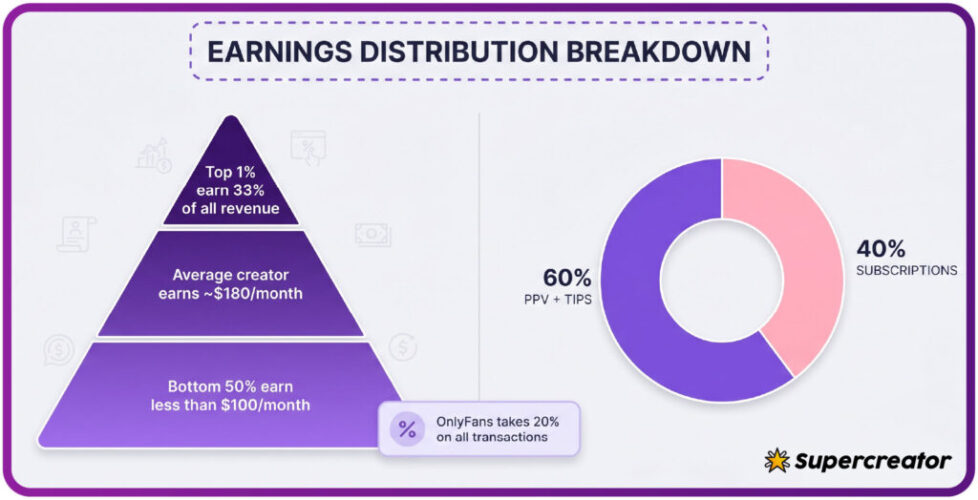
This matters most on free pages. Free pages are set to a price of $0 and earn through pay-per-view messages and tips instead of subscriptions. A large follower base on a free page tells you the top of the funnel is wide, not that anyone is spending.
Budget expectations differ by page type. A typical paid page sits between $4.99 and $15, with averages of $5 to $10. The full paid range runs from a $4.99 minimum to a $49.99 maximum, and there is no base price below $4.99; only promotional first months may dip below that floor.
If you are comparing pages month by month, use this list as a cost reference:
- Free pages: $0 subscription, spending is optional and driven by pay-per-view and tips.
- Typical paid pages: $4.99 to $15 per month, averaging $5 to $10.
- Premium paid pages: up to the $49.99 maximum.
- Platform fee: 20% of everything, so the creator keeps 80%.
Practical tip: never treat a follower count as an audience estimate on its own. Pair it with likes per post and the date of the newest post before you decide a page is worth following.

Likes per post as a signal
Likes per post are harder to fake than followers because they require an action on specific content. The useful figure is the ratio of average likes on recent posts to total followers. A ratio that is consistent across several posts is more trustworthy than one viral spike.
Ratios vary by page age and niche, so treat the bands below as rough guides rather than rules. The direction of the number matters more than its exact value.
| Like-to-follower ratio | What it suggests |
|---|---|
| Above 10% | Unusually high activity; check whether likes are concentrated on a few posts. |
| 3% to 10% | Healthy engagement for an active page with regular posting. |
| 1% to 3% | Moderate engagement; common on larger or older pages. |
| Below 1% | Weak signal; the follower count may be inflated or the page may be inactive. |
One more caveat applies to free pages. Because access is open, likes accumulate from casual visitors who never spend. A strong like ratio on a free page shows attention, not revenue.

Comment quality over comment volume
Comment sections are the least automated part of a public page. Volume alone proves little, since generic replies can be posted quickly. Quality is what separates a real community from a number.
Read the newest ten comments and look for specificity. People who reference a recent post, ask a follow-up question, or answer each other are demonstrating that they actually read the content. For a starting point, onlyfans free photos collects free pages.
Five things to look for in comment threads that suggest genuine engagement:
- Replies that reference details from a specific recent post.
- Conversations between commenters, not only replies to the creator.
- Repeat usernames appearing across several different posts.
- Questions that receive answers from the creator within a day or two.
- A mix of short reactions and longer, detailed comments.
Watch for the opposite pattern as well. Hundreds of near-identical one-word comments posted within minutes of each other usually indicate a coordinated push rather than organic interest.

Posting frequency and recency
The single most useful number on a page is the date of the newest post. Subtract it from today. A gap of a few days is normal; a gap of several weeks usually means the page is dormant regardless of what the follower count says.
Then look at the spacing between the last ten posts. Even gaps suggest a schedule the creator maintains. Clusters followed by long silences suggest bursts of activity around promotions rather than steady output.
Sparse timelines are not automatically bad. Some creators post rarely and charge accordingly, and some free pages use a low posting cadence with pay-per-view messages as the main channel. Read cadence together with price before drawing a conclusion.
Avoid these mistakes when you assess a timeline:
- Judging activity from the lifetime post count instead of recent dates.
- Assuming a pinned post is recent; pinned posts are often old highlights.
- Ignoring the difference between a post date and an edited date.
- Comparing cadence across niches, where posting norms differ widely.
Warning: if a creator raises the subscription price, auto-renew stops. Existing access lasts only until the current paid period ends, so a price change can quietly drop you from the page.

Cross-checking against a ranking site
OnlyFans has no built-in discovery feed or directory. That absence is the reason ranking sites exist, and it is also why those sites are useful as a second opinion rather than a primary source.
A good listing repeats the same public numbers you can verify yourself: followers, post count, and total likes. It should also date its snapshot, because a figure captured months ago may no longer describe the page. For a sense of how free pages are catalogued, this collection of onlyfans free photos shows how listings group pages by price and activity.
Where a listing and the live profile disagree, the discrepancy itself is informative. Compare the two carefully and note which direction the numbers moved.
| Discrepancy | What it often means |
|---|---|
| Listing follower count far above the live count | The snapshot is old, or followers were removed in a purge. |
| Listing post count higher than the live count | Posts were deleted, or the listing counted archived media. |
| Likes similar but followers very different | Follower growth was bought; likes track real content interaction. |
| Listing marks a page as free, profile shows a price | The page switched models, or a promotional period ended. |
BestOnlyFans is one example of a site that aggregates these public figures, and its value depends entirely on how recently it refreshed them. Treat any aggregator as a starting point that still needs a live check.
Building your own shortlist
After a few pages, the process becomes fast. Record three numbers for each candidate and revisit them a week later. Movement in those numbers tells you more than any single snapshot.
The three counters to record before you follow a page:
- The date of the newest post, so you can confirm the page is still active.
- The average likes on the last five posts, so you can compare against the follower count.
- The current subscription price, so you can tell a free page from a paid one and track changes.
Write the numbers down with the date you captured them. A shortlist built this way stays accurate even when a ranking site lags behind, and it keeps you from following pages that only look busy.
BestOnlyFans and similar directories can shorten the search, but the verification step stays with you. Two minutes of checking beats a month of a dead subscription. BestOnlyFans refreshes its rankings every month.
FAQ
Are free OnlyFans pages really free?
Yes. A free page is simply a subscription price set to $0, and the creator earns through pay-per-view messages and tips instead.
Can a large follower count be trusted?
Not on its own. Followers can be purchased or dormant, so a large count can sit above a page with very little current activity.
What is the lowest possible paid subscription?
The base minimum is $4.99. Only promotional first months may dip below that, and the maximum is $49.99.
Why does auto-renew stop after a price change?
When a creator raises the subscription price, auto-renew is cancelled and existing access lasts only until the current paid period ends.